




Free Planning + Navigation Software
OpenCPN
Today, we’re lucky enough to have a number of dedicated software engineers willing to commit time and resources into developing incredible routing, planning and navigation software.
The fore of this community is the OpenCPN team.
Simply put, OpenCPN is incredible software. It can save a circumnavigator thousands of dollars and many, many days or weeks of time. I currently use OpenCPN on three devices:
- MacBook Pro (laptop)
- Google Nexus 7 (tablet)
- Samsung S5 (phone)
Not only is OpenCPN a chartplotter and GPS, using the available plugins one is able to view historical climatology information, GRIB files and by way of their Weather Routing app, calculate the best route for their journey (taking into account your boat’s polar diagram data, and using either historical data via the Climatology plugin or current data via GRIB files…or both).
To some of you this may sound like jibberish. To others, all this navigation capability sounds great but you’re intimidated by anything to do with computers. And finally there’s a particularly unfortunate group that is neither familiar with navigation nor comfortable on computers.
Rest assured, anyone can learn to understand and navigate using OpenCPN. Their website for starters is a comprehensive source of information, with support forums available to follow-up with specific inquiries.
The basics of what you’ll need:
-
The device
- OpenCPN can run on Mac, Windows, Linux, Android and iOS. Android devices in particular can be purchased very cheap
-
GPS signal (optional)
- Many devices come with a built-in GPS (my Nexus 7 and S5 both do). If yours does not, then you should be able to add a USB GPS adapter. I use a GlobalSat BU-353-S4 with my MacBook. It cost $30 on Amazon
-
OpenCPN
- Download the software here.
-
Charts
-
Time + Practice
- Once you have the above, spend time playing with the software. Check out the available plugins here. If you’d like to send files created in OpenCPN to another GPS unit, search Google to figure out how that’s done. For instance, “OpenCPN GPS128” or “OpenCPN GX2200” are both searches I used to find information on connecting to those devices.
FastSeas.com
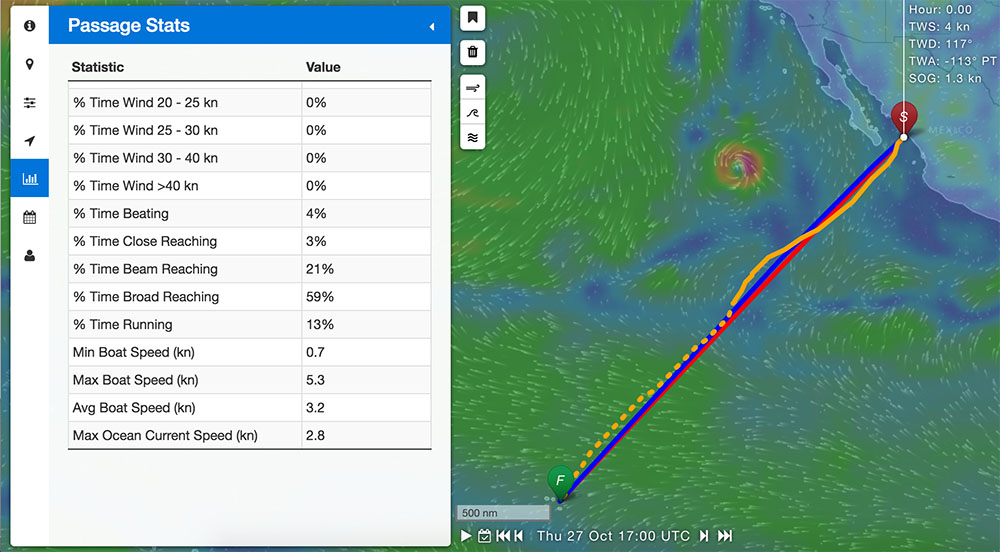
FastSeas is a new and very powerful tool. It allows users to render a ‘fastest route’ prediction for given departure and destination points, based upon current weather forecasts. To use it, you’ll want to create a profile (I connected using my Facebook account) so that you can input and save polar diagram information for your boat. If you don’t know what this is, you can generally find it using a Google search.
Once you have a route planned, you can export it into formats that most GPS units will be able to understand (GPX, KML or KMZ). Within 10 minutes I can generate a 2750 miles course from Mazatlan to the Marquesas, export it into a GPX file, import the GPX file into OpenCPN and be viewing it. Using this powerful tool I’m able to not only understand the best route, but also quickly make ETA predictions.
No Comment